My Classic and Simple Birthday Card

2

Posted by Yuza | Posted in | Posted on 8:03 AM

I make this birthday card black and white on gray background to make it looks classic.
This is my birthday card.

Making of my birthday card

0

Posted by Yuza | Posted in | Posted on 7:08 AM

step 1
I make background using rectangle tool and give gray color.


step 2
I make something like wave using pen tool.


step 3
I copy the wave layer and paste it,then i give black color and put it in front of the white one,and i put a straight line.


step 4
I make a cassette using rounded rectangle tool,pen tool and ellipse tool,and give a tittle of the cassette using type tool with Arial Narrow font and bold it.


step 5
I make partitur using ellipse tool and line segment tool and pen tool,then i copy and paste it and adjust it all.


step 6
I make layer using pen tool and copy paste it then give white and black color,same like make the wave,i put the black one on top.


step 7
I make layer again using pen tool again,same like step 6. But this time i put the white one on top.


step 8
I make 3 stripes using rectangle tool,I copy paste it and give black and white color,then I make one square that I use to cut this 3 stripes and using devide pathfinder to cut it,until its like in the picture,and I delete the big square and rest of stripe that I did not use.


step 9
I make Happy Birthday word using type tool and copy paste it and give black and white color.


step 10
I make some word by myself using type tool and make layer that I copied from layer before in step 6 but now I put white on top and still there is a black one behind it to make it looks classy and simple.


I make my birthday card base on this template and make some modification on position


Assignment 2 calendar

1

Posted by Yuza | Posted in | Posted on 6:40 AM

-step 1

I make a background using rectangle tool, then I fill it with blue gradient.


-step 2

I make a Love using pen tool.


-step 3

I copy and paste the love and arrange it.


-step 4

I make cloud using ellipse tool, I make many circle and make it like cloud, and group it all.


-step 5

I make a chocolate using rectangle tool, and make it looks was biten using ellipse tool then substract it in pathfinder. Then I give dark chocolate color in it.


-step 6

I copy and paste chocolate shape, then give it chocolate color.


-step 7

I make a small chocolate by 2 rectangle with different size and 4 lines, I make rectangle using rectangle tool and lines using line segment tool, hten group it all.


-step 8

I copy and paste small chocolate and arrange it, then I make day initial using type tool.


-step 9

I Make a chocolate love by copy and paste the big love and give it chocolate color.


-step 10

I make date and month using type tool.


-step 11

I make two little star using star tool and put one of it on date 14, and another one at the bottom, this two star use for give information that 14th February not only Valentine's day, but also Chinese new year. and I write it using type tool.


-step 12

I give yellow stripe as finishing touch, I make it using rectangle tool and copy paste it, then arrange it all, and put it as background.

Re-design step by step

0

Posted by Yuza | Posted in | Posted on 5:10 AM

Step 1

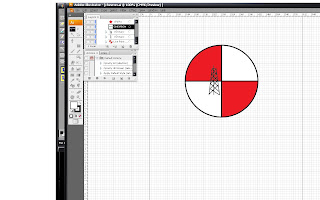
First step, I activated "show grid",  it is help me to know where is the middle point of the circle. And,I start using "ellipse tool" to make a circle, circle finish, i start make horizontal and vertical line in it using "line segment tool", it's finish, I group it all and give red color.


Step 2

I make refinery tower using "line segment tool", it's done. 


Step 3

Then, I make torch and an oil tank using "line segment tool" and "arc tool". Then I give the torch and tank grey color, and make a little fire for the torch.


Step 4

I'm using "type tool" to make Chevron text, and i give it green color and put it under the logo. I finish it. Then I'm using "star tool" to make a star at top right logo. Next, I give red color for the star using "live paint bucket tool". Last I make it all into a group.


Finish. This is My re-design logo :


re-design

chevron logo>re-design

0

Posted by Yuza | Posted in | Posted on 4:19 AM

Photobucket

I'm using circle and give a horizontal and vertical line in the circle,circle with horizontal and vertical line in it is a symbol of earth.
And i give red color which mean brave,red also means fire,that oil can make. White color means pure,as the oil they take from earth.
I'm using green color for Chevron text which means that Chevron care about environment. I put 2 refinery stuff,to make people understand that chevron works in refinery.
and i put a red little star at top right, position and color of the star same with star position and color at California flag, which show people Chevron come from California.

Chevron History

0

Posted by Yuza | Posted in | Posted on 3:46 AM

chevron


The company is in its 125th anniversary in 2004, tracing its roots to an oil discovery in Pico Canyon (now the Pico Canyon Oilfield) north of Los Angeles. This find led to the formation, in 1879, of the Pacific Coast Oil Company, the oldest predecessor of Chevron Corporation. Another side of the genealogical chart points to the 1901 founding of The Texas Fuel Company, a modest enterprise that started out in three rooms of a corrugated iron building in Beaumont, Texas. This company would later become known as Texaco.

Chevron Corporation was originally known as Standard Oil of California, or SoCal, and was formed amid the antitrust breakup of John D. Rockefeller's Standard Oil company in 1911. It was one of the "Seven Sisters" that dominated the world oil industry during the early 20th century. In 1933, Saudi Arabia granted SoCal a concession to find oil, which occurred in 1938. In the early 1950s, SoCal discovered the world's largest oil field (Ghawar) in Saudi Arabia. SoCal's subsidiary, California-Arabian Standard Oil Company, evolved over the years, becoming the Arabian American Oil Company (ARAMCO) in 1944. In 1973, the Saudi government began buying into ARAMCO. By 1980, the company was entirely owned by the Saudis and in 1988, the name was changed to Saudi Arabian Oil Company (Saudi Aramco).

In 1984, the merger between Standard Oil of California and Gulf Oil was the largest merger in history at that time. Because of its size, SoCal divested many of Gulf's operating subsidiaries and sold some Gulf stations and a refinery in the eastern United States to satisfy U.S. antitrust requirements. As part of the merger, SoCal changed its name to Chevron Corporation.

In June 1998 Dynegy, Inc. (NYSE: DYN) was created from the merger of Chevron's former natural gas and natural gas liquids businesses with Dynegy's predecessor, NGC Corp. (formerly NYSE: NGL). NGC had been an integrated natural gas services company around since 1994.

In a merger completed February 1, 2000, Illinova Corp. (formerly NYSE: ILN) became a wholly-owned subsidiary of Dynegy Inc., in which Chevron also took a 28% stake. In 2001, Chevron Corporation acquired Texaco to form ChevronTexaco. On May 9, 2005, ChevronTexaco announced it would drop the Texaco moniker and return to the Chevron name. Texaco remains as a brand name under the Chevron Corporation. On August 19, 2005, Chevron acquired the Unocal Corporation. Because of Unocal's large South East Asian geothermal operations, this made Chevron the world's largest producer of geothermal energy.

Source : http://en.wikipedia.org/wiki/Chevron_Corporation

1st

0

Posted by Yuza | Posted in | Posted on 6:07 PM

My first blog,,